What you'll build
Over the 5 days, you'll build and deploy a real portfolio site from a Figma design. Not a toy example — a live site you can show clients, share online, or use yourself.
THE AI WEB DESIGN SPRINT
A hands-on sprint for working designers. Walk away with a live, coded site and a workflow you can actually use. No coding experience needed.


AI coding blew up.
Everyone's posting.
"Built this in a weekend." "Webflow is dead." "Your job's next."
The only honest answer: build something real yourself and find out.
That's this sprint. Four days. Real project. Real workflow. No hype.

Vibe-coded, with CMS, on a real domain

From Figma to code, in hours — not weeks

With AI and developer tools used by professional developers

Know exactly when AI coding is worth it — and when it isn't
AI coding blew up.
Everyone's posting.
"Built this in a weekend." "Webflow is dead." "Your job's next."
Is any of it actually true?
The only honest answer: build something real yourself and find out.
That's this sprint. Four days. Real project. Real workflow. No hype.
Vibe-coded, with CMS, on a real domain
From Figma to code, in hours
With AI and developer tools used by professional developers
Know exactly when AI coding is worth it — and when it isn't
Webflow expert. AI-powered builder. He shipped a real B2B site with AI.
Julian built his reputation in the Webflow world over years — then used AI to build and launch a full, large-scale B2B website from scratch. Not a demo. Not a tutorial project. A real site, for a real comapny, using this exact workflow.
He's not here to hype AI. He's here to show you how it works in the real world and let you decide if it's right for you.

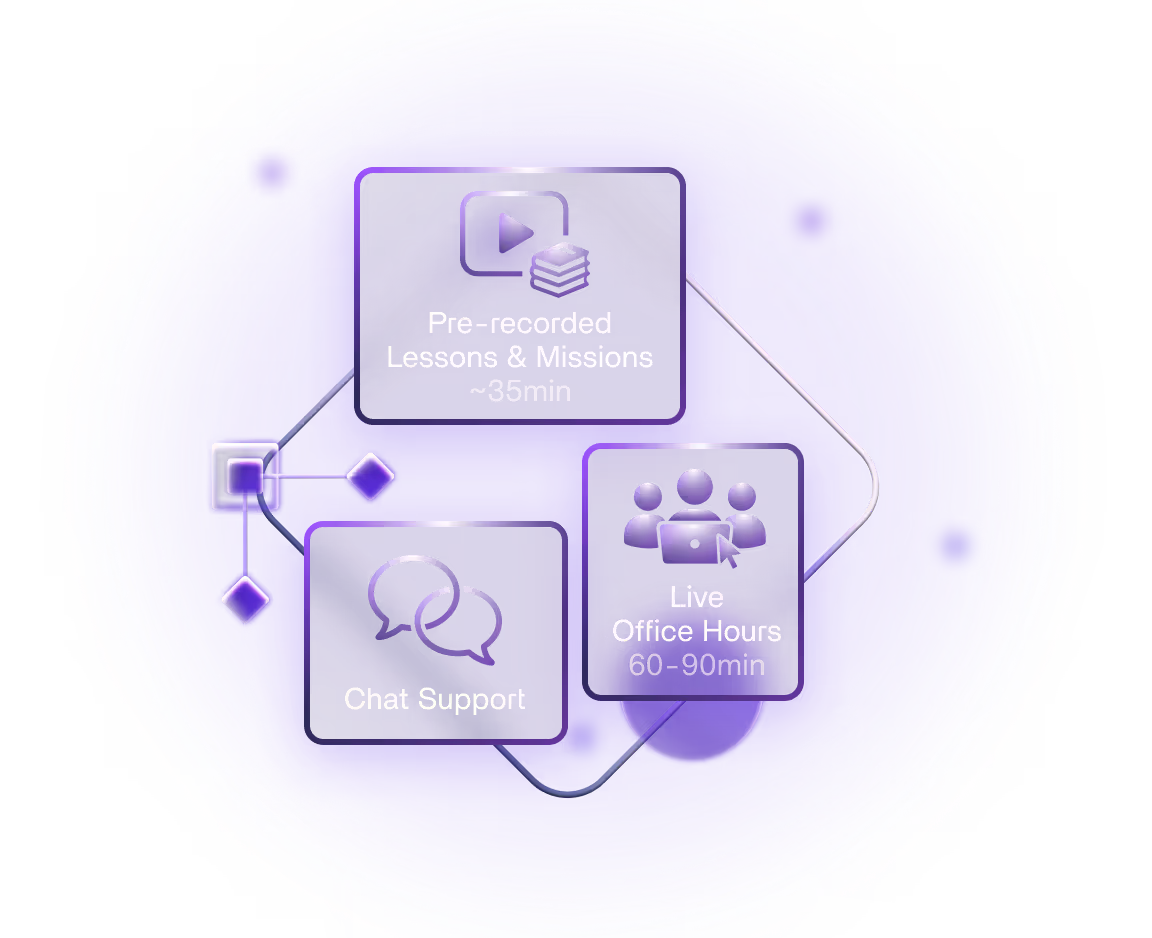
Each morning: A focused pre-recorded 35 minutes lesson with the day's mission.
Each afternoon (live): Office hours with Julian. 60 to 90 minutes, open format: ask questions and get unstuck.
Time: 6pm CEST / 12pm EDT / 9am PDT
Support: Chat community open all week, moderated through the weekend.
Time commitment: 1 to 3 hours per day covers the lesson, build and the live session. You'll also have Wednesday July 1st as a free daywithout any lesson or office hours to catch up if you didn't have time on previews days.


You will need a paid subscription to Claude Pro (~$20/mo). It's also going to be useful if you have a Paid Figma account, although you can work through the sprint even if you don't have one, and if you join early, we can set you up with a Student account (see FAQ)
Everything else — Node, GitHub, Vercel, Sanity CMS — is free.
Never heard of those? Perfect. Day 0 is setup from scratch.
The underlying workflow is compatible with other AI providers like Codex or Gemini, so you can use them if you want, but our sessions and examples use Claude.
Ran and Julian kick off the sprint together live: context on the workflow, what to expect, and how to get the most out of the next three days.
Get Claude Code installed and your tools connected. Everything you need is covered in the session.
Take the provided Figma design and start building with AI. Learn how to prompt effectively, how to keep your design vision intact, and how to debug when things don't look right.
By end of day: Your core portfolio site structure running locally.
No lesson or office hours on this day, to make sure no one is falling behind if you missed any of the previews days or didn't have time to complete the assignments.
Support is still available if you need help or have questions during this day.
Connect a CMS, push your site live, add a custom domain.
Office hours: Thursday, July 2 · 6pm CEST / 12pm EDT / 9am PDT
By end of day: Your site is live on the internet.
Add animations, scroll effects, and custom interactions. Adjust the design: change colors, swap sections, make it feel like something you actually built. This is where your designer instincts take back over.
Office hours: Friday, July 3· 6pm CEST / 12pm EDT / 9am PDT
By end of day: A live, personalized, interactive portfolio site, and a workflow you've experienced end to end.
Saturday July 4 through Sunday July 6
The chat platform stays open and moderated through the weekend. Catch up, polish, or go deeper at your own pace.
Over the 5 days, you'll build and deploy a real portfolio site from a Figma design. Not a toy example — a live site you can show clients, share online, or use yourself.
Over the 4 days, you'll build and deploy a real portfolio site from a Figma design.
Not a toy example. A live site you can show clients, share online, or use yourself: with a working CMS, animations and scroll effects, and a custom domain option.
The Figma design is provided as your starting point. By Day 4, the goal is to make it feel yours.
The confidence boost provided by the instructor (Julian) eliminated the hesitation and intimidation that I faced after opening the terminal. I really liked the crisp sprint aspect of the course; each lesson was to the point and focused on the important stuff. Also, Office Hours were great for Q&A, providing solutions, and brainstorming approaches.

The sprint helped mitigate most of the development environment blockers that come with vibe coding, especially from a designer's perspective.

A massive thank you to Julian! This sprint has been eye-opening.
I learned a ton from Julian! Using Claude and Cursor to build the project in Next.js was a game-changer, and it's something I'll definitely be adding to my workflow. I also had no idea about Sanity or hosting on Vercel before this. I'm really glad to have those tools in my toolkit now. Hoping to learn more from Julian in the future!

Thanks so much for the amazing AI sprint, man. It has been so eye-opening and rewarding. As someone who’s built his entire business on Webflow, I feel so empowered to be able to tap this dev potential beyond Webflow.

Thanks so much for such a great experience, this sprint was amazing. Just finished the project, and it’s officially my second website that I’ve ever made! Such a great feeling to make something like this without any previous experience. It’s good to see that there’s more options nowadays how to create something amazing. Definitely gonna experiment more in the future!
The most valuable part of the sprint was stepping outside the WordPress/HTML world and exploring a little of Next.js with Claude Code, experiencing the possibilities, and seeing major opportunities lying ahead.

The most valuable part was learning the mindset for using AI for web development, as well as the intro to the various tools and services.

The energy and all the tips, ideas, and new ways of working that Julian brought made it so special. I also loved the format: a condensed, four-day approach where you could watch a video in the morning, work on it during the day, and then join office hours in the afternoon. The pace was great.

I had zero development background and had never used Claude or any of the sprint tools before. Since taking it, it's all I've used. I learned I don't have to understand how everything in the workflow works to create the same work, much faster and with more control.

The entire set-up, the pace, the focus points, the way Julian ran the sprint. The completeness was a true eye-opener for me. Money super well spent. Not to be missed!

There wasn't a thing that wasn't valuable. The most valuable part was the know-how of a process that actually works. It opens the door to so many possibilities.

Seeing how Julian uses the tools and understanding his workflow was the most valuable part. He leans toward coding, but he clearly has a strong design background and comes from Webflow. That makes it much easier for designers like me to bridge the gap between design and development.
The course is really good, and Julian is very knowledgeable. The most valuable part was his step-by-step method for working with Claude: make a change, check it, ask it to improve, repeat.

The combination of lessons and fantastic office hours was very valuable, even though I couldn't attend live. The pace and length were perfect for getting a good grasp of a more technical stack than a traditional Figma-to-Webflow setup. Ship Studio makes the whole workflow feel less daunting.

The way Julian taught it was so valuable: how to prompt, how to figure things out, how to talk to the agent, how to get Figma into Claude. Everything taught in the sprint was valuable.

I was able to bring a Figma design to life with a CMS on a free plan, which most vibe-coding courses don't cover. The course also showed me how to add multiple languages, GSAP animation, a password-protected portfolio and a contact form.

I just shipped a fully responsive, fluid portfolio website. It was genuinely one of the more interesting builds I've done recently. I'll definitely be using this workflow in future projects. It made the process feel much more structured and reliable.

It empowered me to work with AI and use new tools in the future, because this framework is flexible and it's what pro devs use. Julian's teaching ability is amazing. He made things very clear, very efficiently, and I could feel he really loves to help.

I appreciated being told what the many pieces of the puzzle are and how to use them. I never would have been able to figure that out on my own.

I've been intimidated by AI for a while, but the process was much easier than I thought. Now I can generate more value for my agency.

The most valuable part was the basic setup and a clear understanding of how the tech stack works. A very practical use case, with clear explanations.

While I was on vacation, I had my admin take the sprint, and it delivered. She's now creating stunning sites in hours, and we're delivering them at record quality and speed. It's transformed our margins and client experience.

The sprint pointed me to a clearer path forward in the world of AI. I learned skills in a short time that I can use right away!

Thank you for sharing these AI superpowers. I had a lot of fun creating my project and playing around with the tool stack. Most technical barriers are simply blown away with this workflow.

By far one of the most interesting and engaging workshops I've taken part in. Thanks for the vibe and your energy in all the videos and office hours, and thanks to Flux Academy for making this happen.

Leave your details and we'll let you know as soon as we have a date for the next sprint:
Everything you need to know about The Web Design AI Sprint


The AI coding workflow is real. Whether it belongs in your toolkit is a question worth answering yourself, not from someone else's demo or a Twitter thread.
This sprint is the most practical way to find out.